AODA Website Compliance in 2026: A Plain-English Guide for Ontario Businesses
Key takeaways
- Private and non-profit organizations with 50+ employees in Ontario must make public websites and web content meet WCAG 2.0 Level AA.
- Organizations with 20+ employees must file an accessibility compliance report every three years; the next is due December 31, 2026.
- AODA fines can reach $100,000 per day for corporations, though enforcement usually starts with orders to comply.
- Building to WCAG 2.2 AA covers the older 2.0 standard and is the sensible target for any new site.
- Accessibility overlays and widgets do not make a website compliant on their own.
Accessibility is easy to put off until a deadline or a complaint forces it. With Ontario's next compliance reports due at the end of 2026, now is a good time to understand exactly what the law asks of your website, and what it doesn't.
Who the AODA website rule applies to
The website requirement sits in section 14 of Ontario's Integrated Accessibility Standards Regulation. It applies to designated public-sector organizations and to private and non-profit organizations with 50 or more employees in Ontario. What applies to you depends on headcount:
| Employees in Ontario | Website must meet WCAG 2.0 AA? | Compliance report due Dec 31, 2026? |
|---|---|---|
| 1–19 | No (other AODA duties still apply) | No |
| 20–49 | No | Yes |
| 50+ | Yes, for public websites and web content | Yes |
For large organizations the rule covers public websites and web content published after January 1, 2012. Smaller organizations aren't required to meet WCAG, but accessible design still widens your market and reduces legal risk under human rights law.
What WCAG 2.0 Level AA means in practice
WCAG 2.0 Level AA is a set of testable success criteria. AODA exempts two of them: live captions and audio descriptions for prerecorded video. For a typical business site, the rest translates into:
- Text alternatives: meaningful alt text for informative images
- Colour contrast: at least 4.5:1 for normal text
- Keyboard access: every link, menu and form usable without a mouse, with visible focus
- Forms: clear labels, instructions and error messages
- Structure: proper headings, lists and landmarks so screen readers can navigate
- Captions: for prerecorded video with audio
- Resizable text: pages that still work when zoomed to 200%
- Descriptive links: no wall of "click here"
WCAG 2.2: build to the newer standard
The regulation references WCAG 2.0, but the W3C has since published WCAG 2.2. It adds criteria such as minimum target sizes for buttons, focus that isn't hidden behind sticky headers, and accessible authentication. Because WCAG 2.2 AA includes nearly everything in 2.0 AA, building to WCAG 2.2 is the sensible target for any new site. It keeps you compliant today and ready if Ontario updates the reference.
The accessibility compliance report due December 31, 2026
Businesses and non-profits with 20 or more employees in Ontario must file an accessibility compliance report every three years through the province's Accessibility Compliance Reporting Portal. The next one is due December 31, 2026. The report asks you to confirm compliance with the requirements that apply to you, including the website rule if you have 50 or more employees.
The province's guide to completing your accessibility compliance report explains the questions. Do the website audit before you file, not after, so your answers are accurate.
AODA fines and enforcement
Under the Act, AODA fines can reach $100,000 per day for corporations and $50,000 per day for directors and officers. In practice, enforcement usually begins with compliance orders, but failing to file the report is one of the easiest gaps for the province to detect.
Accessible website cost: retrofit vs rebuild
The accessible website cost depends mostly on when you deal with it. Building accessibility into a redesign adds relatively little, because the work is part of good design and development anyway. Retrofitting an older site is costlier, especially if its theme, plugins or page builder produce inaccessible code you can't easily change.
A sensible sequence:
- Audit: automated scanning plus manual keyboard and screen-reader testing
- Prioritize: fix templates and components first, since one fix repairs every page using them
- Remediate content: alt text, headings, link text and PDFs
- Train editors so new content stays compliant
- Re-test before filing your report
Overlays and widgets that promise one-click compliance don't fix the underlying code, and they can interfere with the assistive technology people already use.
Common issues we find on business websites
Most sites fail on the same handful of problems, and most are quick to fix once found:
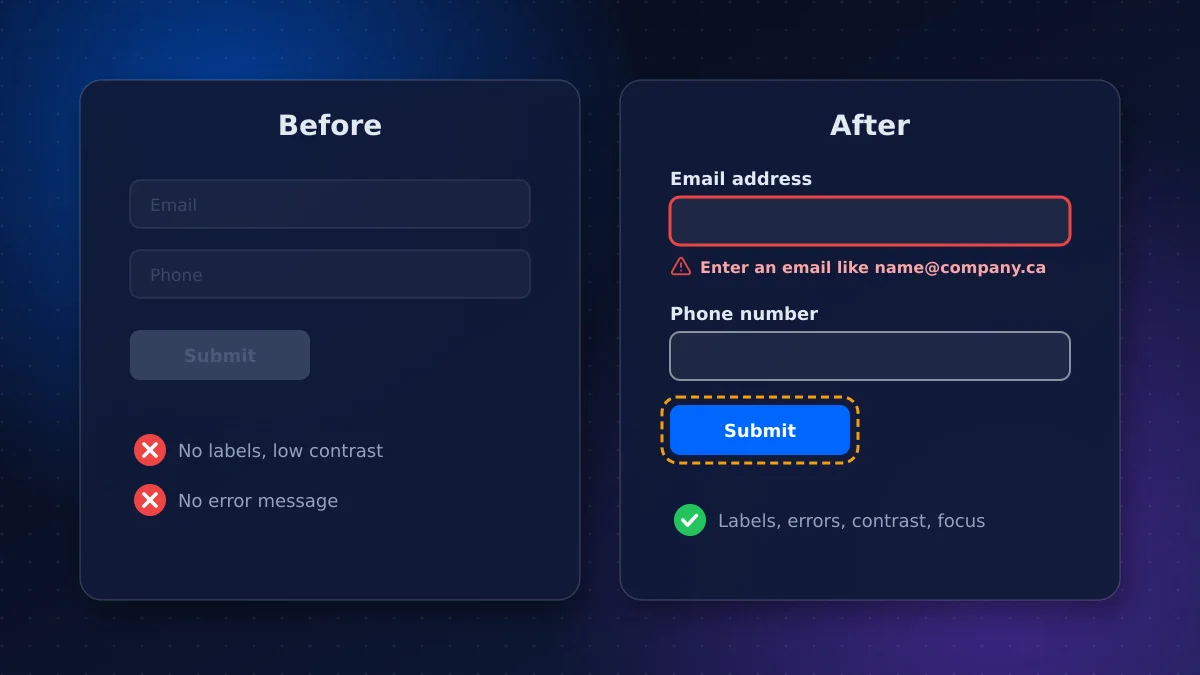
- Form fields without labels, where placeholder text disappears as you type
- Brand colours with low contrast, especially light grey text and white text on pale buttons
- Images of text in banners that screen readers can't read
- Inaccessible PDFs, such as menus, price lists and brochures uploaded as scanned images
- Cookie banners and pop-ups that trap keyboard focus
- Carousels that auto-rotate with no pause control
- No skip link, forcing keyboard users through the whole menu on every page
Who should own accessibility internally
Assign one person, often in marketing or operations, to own accessibility after launch. They don't need to be technical; they need a short checklist for new content, authority to push back on inaccessible designs, and a reminder to re-test before each compliance report.
Beyond Ontario
If you also operate in other provinces, Ottawa-based firms selling to federally regulated organizations may meet accessibility expectations under the Accessible Canada Act, which covers sectors such as banking, telecommunications and transportation. Building to WCAG 2.2 AA is the common denominator that satisfies most requirements and procurement checklists across Canada.
Conclusion: fix the templates, then file with confidence
AODA website compliance is manageable when you treat it as a design standard rather than a legal emergency. Know your headcount threshold, audit against WCAG, fix the shared templates first, and file your accessibility compliance report before December 31, 2026. This guide is not legal advice; confirm your obligations with the province or counsel.
Accessibility is built into every site we deliver through our business website service. If you need an audit or remediation before the deadline, request an accessibility review and we'll scope the fixes and timeline.
Frequently asked questions
Does the AODA website requirement apply to small businesses?
The WCAG 2.0 Level AA website rule applies to private and non-profit organizations with 50 or more employees in Ontario. Smaller businesses aren't required to meet it, though other AODA duties apply, and businesses with 20 or more employees must still file a compliance report.
When is the next AODA compliance report due?
Businesses and non-profits with 20 or more employees in Ontario must file their next accessibility compliance report by December 31, 2026, through the province's Accessibility Compliance Reporting Portal. Reports are due every three years.
Is WCAG 2.2 required under the AODA?
No. The regulation references WCAG 2.0 Level AA. WCAG 2.2 AA includes nearly all of the 2.0 criteria plus several newer ones, so building to 2.2 meets the current rule and prepares you for future updates.
Do accessibility overlays make a website AODA compliant?
No. Overlays and widgets don't fix the underlying code that causes barriers, and they can conflict with the screen readers and other tools people already use. Compliance requires fixing the site itself.
Vaibhav Malhotra
Founder, VMR Technologies
Vaibhav Malhotra is the founder of VMR Technologies, where he leads the team building custom websites, e-commerce platforms, and AI solutions for businesses across the Greater Toronto Area and beyond. He writes about practical software and AI strategy for non-technical decision-makers — focused on what actually drives results rather than hype.